AiCore - Full Visibility Into Your Store's AI Activity
v1.1.2AiCore — Full Visibility Into Your Store's AI Activity
WebtechSolutions AiCore now gives Magento merchants complete transparency and control over every AI-powered interaction in their store.
Please note that this is a core base module included with the platform and is not available for standalone purchase.
What's New
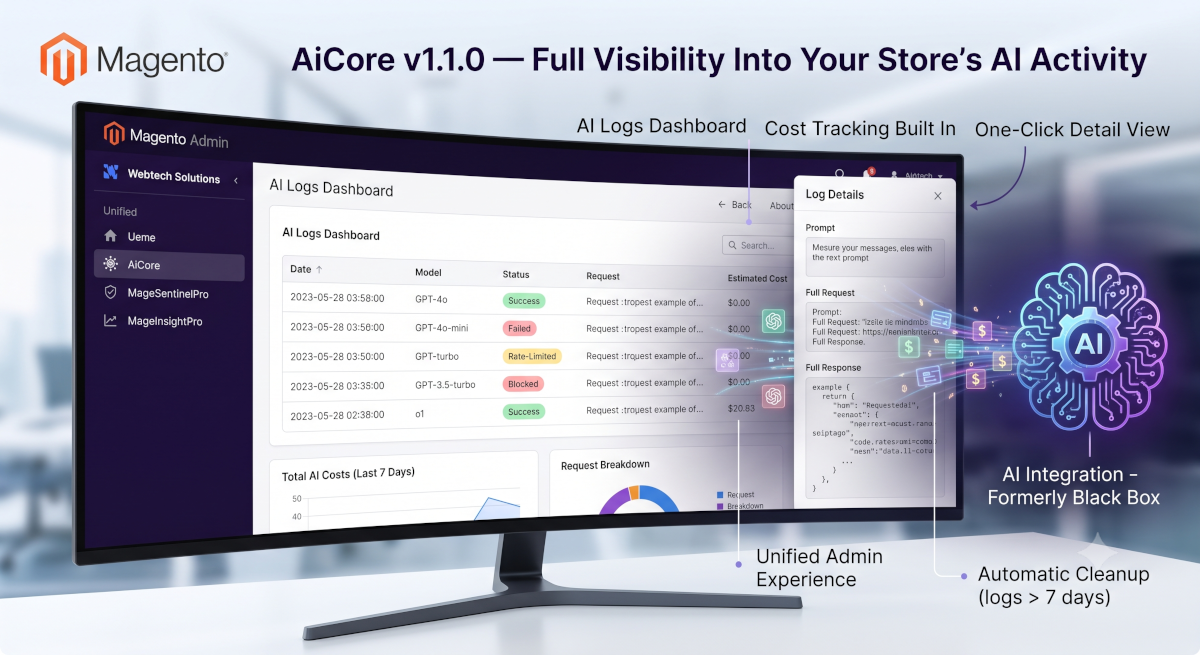
AI Logs Dashboard — A brand-new admin grid tracks every OpenAI request and response your store makes, whether successful, failed, rate-limited, or blocked by an authentication error. No more guessing what happened behind the scenes.
Cost Tracking Built In — See the estimated cost of every AI call at a glance, calculated automatically per model (GPT-4o, GPT-4o-mini, GPT-4-turbo, GPT-3.5-turbo, o1). Know exactly what your AI features are costing you.
One-Click Detail View — Click into any log entry to see the full picture: prompt, request, and response, all in a clean slide-over panel — without cluttering the main grid.
Automatic Cleanup — A built-in daily housekeeping job clears out logs older than 7 days, keeping your database lean without any manual maintenance.
Unified Admin Experience — All Webtech Solutions tools (AiCore, MageSentinelPro, MageInsightPro) now live under a single, organized "Webtech Solutions" menu — easier to find, easier to manage.
Why It Matters
As AI becomes core to modern storefronts, merchants need the same visibility and accountability they expect from any other business-critical system. AiCore v1.1.0 turns your AI integration from a black box into a fully auditable, cost-aware part of your Magento operation.
Upgrade today and take control of your store's AI activity.
1.1.2
changed
The Webtech Solutions admin menu sanitized.
v1.1.1
Changed
- Cleaned up duplicated AI model sync logic between AI Core and AI Monitor: the default-model dropdown now reads from the single shared model-sync source instead of a second copy; the "Sync AI Models Now" button, the row-level "View" action, and the estimated-cost grid column now share one implementation across both modules instead of two nearly-identical copies
v1.1.0
Added
- AI Logs admin grid (Webtech Solutions > AI Logs) displaying centralized OpenAI request/response log entries with filtering and pagination
- Estimated Cost column with USD formatting and per-model token pricing (gpt-4o-mini, gpt-4o, gpt-4-turbo, gpt-3.5-turbo, o1)
- View action opening a slide-over modal with full log details (overview, prompt, request, response)
- Daily cron job cleaning up log entries older than 7 days
- Centralized logging of all OpenAI requests and responses (successful, failed, rate-limited, auth errors) to the database
- "Webtech Solutions" top-level admin menu entry grouping AI Core, MageSentinelPro, and MageInsightPro settings
Changed
- AI Logs grid: removed conflicting column defaults causing empty columns; removed oversized text columns (prompt/request/response) from the grid in favor of the detail modal
Fixed
- Grid rendering issue causing blank columns in the AI Logs listing
v.1.0.0
2026-03-20
- AI Logs grid: fixed empty columns (removed conflicting childDefaults), removed oversized text columns (prompt/request/response) from grid — full data visible in modal popup; added Est. Cost column with USD formatting; added View action button opening a slide-over modal with full log details (overview, prompt, request, response); added cron job aicore_clean_ai_logs running daily at 02:00 UTC deleting records older than 7 days; added estimated_cost DB column with per-model token pricing (gpt-4o-mini, gpt-4o, gpt-4-turbo, gpt-3.5-turbo, o1)
- Centralized AI request/response logging: minden OpenAI kérés és válasz (sikeres, hibás, rate-limited, auth-hiba) bekerül a webtechsolutions_aicore_log adatbázis táblába; az "AI Logs" adminisztrációs menüpont (Webtech Solutions > AI Logs) UI grid segítségével jeleníti meg a naplóbejegyzéseket szűrési és lapozási lehetőséggel
2026-03-19
- Added "Webtech Solutions" top-level admin menu entry (WebtechSolutions_AiCore::webtech_solutions, sortOrder 55); AI Core config link moved under it; MageSentinelPro and MageInsightPro now nest under this shared parent
2026-03-18
- Moved AI model sync controls (AI Models Last Synced label, Sync AI Models Now button, available_models hidden storage) from MageSentinelPro to AI Central Settings; Default AI Model select now refreshes dynamically from synced model list; added admin route and SyncModelsButton block to AiCore module
- Initial implementation: centralized OpenAI API client base module with encrypted API key storage, model selection (GPT-4o, GPT-4o-mini), organization ID support, configurable endpoint and timeout, PII sanitization (email, IP, bearer token, account number masking), dedicated request/response logging to magesentinel_ai_core.log, and specific error handling for rate limits (HTTP 429) and invalid/expired API keys (HTTP 401)